devrig CLI
Independent open-source project. MCP Steroid and devrig are independent open-source projects. They are not made by, endorsed by, or affiliated with JetBrains s.r.o. IntelliJ IDEA, PyCharm, GoLand, WebStorm, Rider, CLion, and JetBrains are trademarks of JetBrains s.r.o.
What is devrig?
devrig is a small standalone command-line tool that connects your AI Agent to a JetBrains IDE running MCP Steroid — with no manual MCP configuration.
It does three jobs:
- Registers MCP Steroid with your coding agent.
devrig install <agent>adds devrig as anmcp-steroidstdio MCP server in Claude, Codex, or Gemini. - Bridges your agent to every running IDE at once. When your agent launches
it as a stdio MCP server (
devrig mcp), devrig discovers all the IntelliJ-based IDEs running on your machine — across projects — and routes the agent’s MCP Steroid calls to any of them through a single connection. One bridge, every IDE. - Provisions an IDE.
devrig backend download,devrig backend start, anddevrig backend stopdownload and run a managed IntelliJ backend under devrig’s home directory, so an agent can spin up an IDE with no manual setup.
One bridge, every IDE
A single devrig mcp process connects your AI Agent to all the IntelliJ-family
IDEs running on your machine at once — each open on a different project — and can
download and start more on demand:
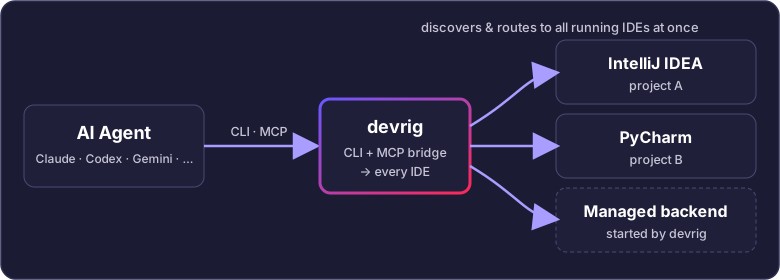
devrig process bridges your agent to every IntelliJ-family IDE running on the machine — and can start more.devrig is a Java application. The one-command installer downloads devrig
together with a matching Java runtime into ~/.mcp-steroid, so there is nothing
to set up by hand. To run devrig under a Java you manage instead, point
DEVRIG_JAVA_HOME (or JAVA_HOME) at it.
Install
Register devrig as the mcp-steroid stdio MCP server in your coding agent:
devrig install claude
devrig install codex
devrig install gemini
The agent must be one of claude, codex, or gemini. After a successful
install, devrig prints the agent it registered, the JAVA_HOME it recorded, and
the exact stdio command (devrig mcp) the agent will run.
Commands
Run devrig --help (or devrig -h) for the authoritative usage, and
devrig --version (or devrig -v) for the version. Help is generated from the
same command tree that performs the work, so every nested command has focused
help such as devrig install --help and devrig backend download --help.
The equivalent discoverable route is devrig help <command>, including nested
paths such as devrig help backend download. devrig tools prints the full
MCP-tools-as-CLI reference — every tool command’s usage line and flags on one
page, written for coding agents.
If required values are missing, devrig prints that focused help and identifies all missing values in one
pass, including allowed enum values and alternatives such as --code / --code-file. Human output may
use terminal color. Commands that advertise --json emit one ANSI-free JSON document for agents and
scripts.
devrig
├── mcp
├── list_projects [--json]  (aliases: projects, project)
├── list_windows [--json]
├── execute_code ... [--json] [--out <path>]
├── execute_feedback ... [--json]
├── take_screenshot ... [--json] [--out <path>]
├── input ... [--json]
├── fetch_resource ... [--json]  (alias: prompt)
├── open_project ... [--json]
├── backend [--json]
│   ├── download [<id>] [--version <v>] [--json]
│   ├── start [<id>] [--version <v>] [--json]
│   ├── stop [<id>] [--version <v>] [--json]
│   └── provision [<id>] [--json]
├── install [--json]
│   ├── claude [--check]
│   ├── codex [--check]
│   ├── gemini [--check]
│   ├── config [--json]
│   ├── devrig
│   └── plugin [--check]
├── tools
├── help [<command>...]
└── version [--json]
Human output is formatted for the terminal and uses color when supported.
Commands that advertise --json emit exactly one ANSI-free JSON document on
stdout, suitable for an agent or a pipeline:
$ devrig version --json
{"version":"<version>"}

$ devrig install --json | jq -c '.targets[] | {name, kind}'
{"name":"claude","kind":"agent"}
{"name":"codex","kind":"agent"}
...
Generated MCP-tool commands suppress their live progress stream in --json
mode because agent shell tools commonly merge stderr into their command result.
Without --json, the same commands keep live progress on stderr and readable
results on stdout.
Commands that do not have a coherent single-document response, including
mcp, agent registration, and plugin installation, reject --json instead of
mixing progress text with structured output.
devrig mcp
Runs devrig as an MCP stdio server. This is the command your coding agent
launches after devrig install — you normally don’t run it by hand. While
running, it discovers IDEs and bridges the agent’s MCP Steroid calls to them.
The legacy spelling
devrig mpcis still accepted as a hidden alias, so older agent registrations keep working. Usedevrig mcpfor new setups.
MCP tools as direct commands
The same MCP tools exposed through devrig mcp are also regular shell
commands. Every one supports --json; required inputs, types, enum choices,
aliases, and help are generated from the tool schema rather than maintained in
a second command definition.
| Command | Purpose and important inputs |
|---|---|
devrig list_projects | Lists open projects and the routing keys accepted by --project_name. |
devrig list_windows | Lists attended IDE windows, modal/indexing/initialization state, and background tasks; it is not a project-routing or Maven/Gradle readiness gate. |
devrig execute_code | Runs Kotlin in an IDE. Requires --project_name, --task_id, --reason, and either --code or --code-file; accepts --modal, --timeout, and --out. Quote inline Kotlin for the shell, for example --code='println("hello")', or prefer --code-file; use --code-file=- for stdin. |
devrig execute_feedback | Rates an execution. Requires --project_name, --task_id, --success_rating, and --explanation; accepts the exact optional --execution_id, and code can also come from --code-file. |
devrig take_screenshot | Captures an IDE image. Requires --project_name, --task_id, and --reason; accepts --window_id and --out. |
devrig input | Sends keyboard and mouse steps to a window. Requires --project_name, --task_id, --reason, --window_id, and --sequence. |
devrig fetch_resource | Fetches an mcp-steroid:// guide given as a positional URI plus --project_name. devrig prompt is an alias; the former --uri spelling remains accepted for existing scripts. |
devrig open_project | Opens --project_path. When one backend already owns that path, devrig reuses it automatically; use --backend_name to choose among candidates for a new or multiply-open path. --trust_project is on by default and --no-trust_project disables it. --wait polls for up to 300 seconds and returns the opened project’s opaque project_name, backend_name, and canonical path. This proves routing, not window or Maven/Gradle readiness. |
Use command-scoped help for the authoritative grammar, for example:
$ devrig execute_code --help
$ devrig list_projects --json
$ devrig open_project --project_path="$PWD" --task_id=demo-open --reason="open current project from CLI" --wait --json
$ devrig execute_code --project_name="PROJECT_NAME_FROM_LIST_PROJECTS" --code='println("hello")' --task_id demo --reason 'verify IDE access' --json
$ devrig prompt mcp-steroid://prompt/skill --project_name="PROJECT_NAME_FROM_LIST_PROJECTS" --json
Generated tool commands do not repair the launcher or write to PATH; they
only perform the requested tool call. Progress and diagnostics go to stderr,
while stdout remains human output or one clean JSON envelope.
devrig install [--json]
With no target, lists every install target and detects which agent CLIs are on
PATH. --json emits the same inventory as a targets array.
devrig install <agent> [--check]
Registers this devrig binary as the mcp-steroid stdio MCP server in the
selected agent. --check is read-only: it reports registration drift and IDE
reachability without changing configuration.
devrig install config [--json]
Prints the manual mcpServers configuration plus the equivalent Claude,
Codex, and Gemini add commands. --json exposes serverName, mcpServers,
and tokenized agentCommands fields.
devrig install devrig
Re-registers devrig’s stable launcher and user PATH entry.
devrig install plugin [--check]
Installs MCP Steroid into locally running JetBrains IDEs. --check lists the
IDEs that would be asked without showing installation dialogs.
devrig backend [--json]
Lists discovered backends (with versions), grouped as MCP Steroid backends,
other/incompatible IDEs, and installed-but-not-running (startable) backends.
Per-backend open projects are listed by devrig list_projects. --json emits a
single machine-readable object on stdout (pipe through jq); the default is
human-readable text.
devrig list_projects [--json]
Lists open projects across all discovered backends. The default is a readable
project/backend table. --json emits the standard generated-command envelope;
project rows are under .data.content[].json.projects[]. devrig projects is the
compatibility alias with identical help, behavior, and output; the singular devrig project
spelling remains accepted, but its former top-level --json shape is replaced by the generated
envelope described above.
devrig backend download [<id>] [--version <v>] [--json]
With no id, lists the IDEs available for download. With an id, downloads and
installs a managed backend under devrig’s home directory. The id accepts
<product>, <product>:<version>, or <product>-<version> — for example
idea-community, idea-community:2026.1, or idea-community-2026.1.
Known product ids: idea-ultimate, idea-community, pycharm-pro,
pycharm-community, goland, webstorm, rider, clion, rustrover,
phpstorm, rubymine, datagrip, mps, android-studio.
MPS is published without a Linux ARM64 or Windows ARM64 distribution, so those two hosts report the platform as unavailable rather than downloading a mismatched archive.
devrig backend start [<id>] [--version <v>] [--json]
With no id, lists installed backends. With an id, starts an installed managed
backend in detached mode and prints its pid, log, and config paths. A
product-only id prefers the highest locally installed version.
devrig backend stop [<id>] [--version <v>] [--json]
With no id, lists currently running backends. With an id, stops a managed
backend by its pid file. A product-only id prefers the highest locally
installed version.
devrig backend provision [<id>] [--json]
With no id, lists port-discovered IDEs that can be provisioned. With an id
(for example port-63342), prints manual MCP Steroid plugin install instructions
for that IDE.
Options and environment
Options:
--debugenables verbose stderr logging (also enabled byDEVRIG_DEBUG).--jsonemits one ANSI-free JSON document where advertised:backend,list_projects(alsoprojectsand legacyproject),install,install config,version, backend lifecycle commands, and every schema-generated MCP tool command.--help,-hprints command-scoped help and exits.- Root
devrig --version/devrig -vprints the devrig version and exits. Backend lifecycle--version <v>options select an IDE version instead.
Environment variables:
DEVRIG_JAVA_HOMEselects the JDK/JRE used to launch devrig instead of the bundled runtime. It overridesJAVA_HOMEfor the devrig process only.DEVRIG_JVM_OPTSadds JVM options to the devrig launch, for example-Xmx512m.
Example: an agent provisions an IDE
This is the typical end-to-end flow where an agent gets a working IDE with no manual setup:
# 1. Register devrig with your agent (once)
devrig install claude

# 2. Download a managed IntelliJ IDEA Community backend (if not yet installed)
devrig backend download idea-community
Once downloaded, the agent can open a project immediately — steroid_open_project
detects the installed (not-yet-running) backend as a startable candidate, starts
it automatically (blocking until reachable), and opens the project in a single
call. No separate devrig backend start step is needed.
To stop the backend when done:
devrig backend stop idea-community
devrig backend start <id> / devrig backend stop <id> still exist for
explicit lifecycle control when you prefer it.
Frontendless IntelliJ IDEA Ultimate 2026.2
For unattended Java semantic work, devrig can run IntelliJ IDEA Ultimate 2026.2 (baseline 262) as a native Remote Development backend with MCP Steroid installed:
devrig backend download idea-ultimate --version 2026.2.0.1
After the download, call steroid_open_project normally. It starts the backend on demand, waits until MCP
Steroid is reachable, and routes the requested project. No separate devrig backend start command and no
Remote Development client window are required.
This mode is frontendless. The validated native IU-262 run logged Remote Development backend mode with
headless=false; more generally, backend product mode takes precedence over the raw AWT-headless flag, and
only plain non-backend headless mode is unsupported. A window or screenshot is therefore not a readiness
requirement: wait until the requested path appears in steroid_list_projects, keep its returned
project_name, then trigger and await Maven/Gradle import before indexed semantic work. If an attended
frontend exists, steroid_list_windows remains useful for dialogs and indexing progress.
The native frontendless launcher is intentionally limited to IDEA Ultimate baseline 262. Other managed products/build lines currently use their standard launcher and may still need a display/Xvfb.
Next Steps
- Getting Started — install the MCP Steroid plugin and connect your AI Agent
- Connect your AI Agents — server URL and ready-to-paste CLI commands
- GitHub Issues — report bugs or request features